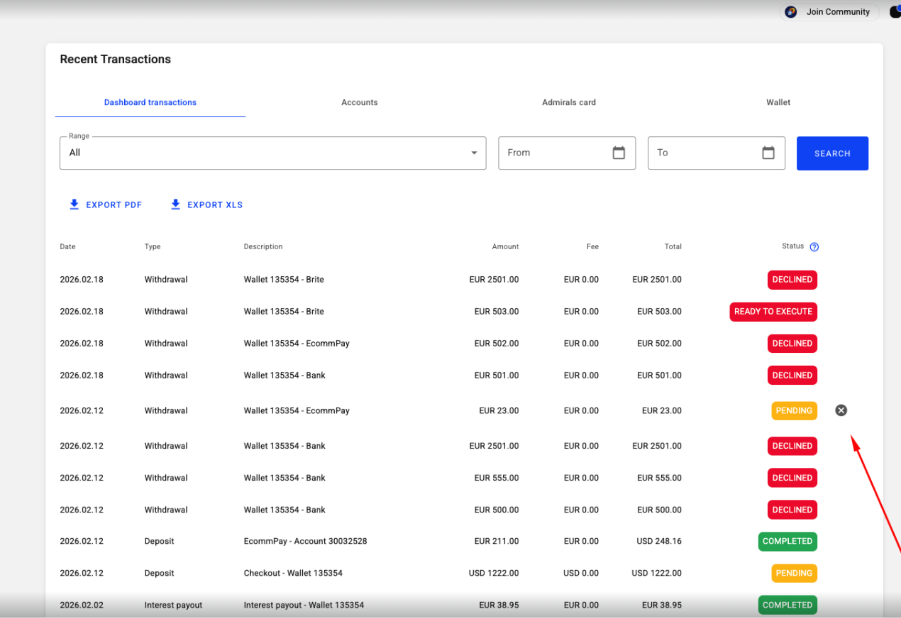
The withdrawal cancellation feature is available in the Dashboard → Transactions section and allows clients to cancel withdrawals that have not yet been processed.
Which Withdrawals Can Be Canceled?
Clients can cancel withdrawals with the following statuses:
- Pending
- Waiting for approval
For these statuses, a cancellation icon (✖) is displayed next to the withdrawal transaction.
What to Do
Go to Dashboard → Transactions
- Finds the withdrawal you want to cancel with status Pending or Waiting for approval
- Clicks the ✖ (Cancel) button next to the transaction
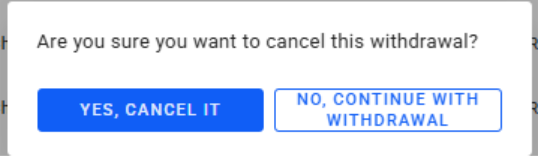
- A confirmation pop-up appears
Client selects:
- Yes, cancel the withdrawal — to proceed with cancellation
- No, proceed with withdrawal — to keep the withdrawal request active
Withdrawals with the following statuses cannot be canceled
- Ready to execute
- Waiting for info
In these cases, please contact Customer Support
Was this article helpful?
That’s Great!
Thank you for your feedback
Sorry! We couldn't be helpful
Thank you for your feedback
Feedback sent
We appreciate your effort and will try to fix the article